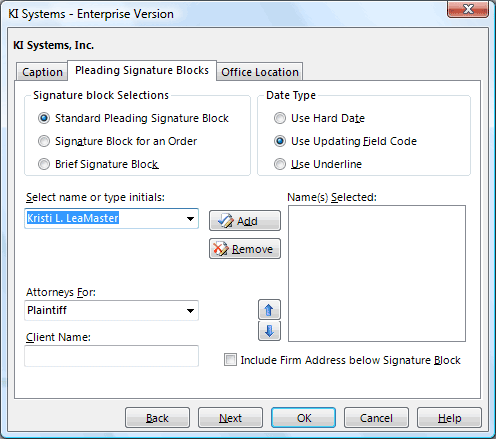
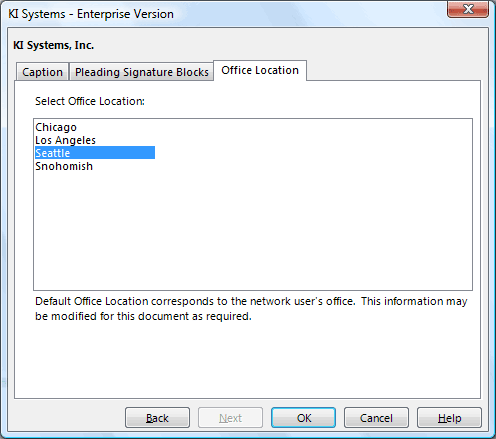
The following is a sample of the Pleading Template wizards. Wizards are tailored to the requirements of each court and provide an easy way to produce Caption Bank Documents and Final Pleadings:
rambutan pit dior outlet online pantone reflex blue cmyk prada crossbody wallet prada clearance prada nylon bags 1k followers instagram mutual instagram followers catalina jazz festival cardinal materials prada runway glasses chatgpt for seo prada saffiano tote followers like instagram chatgpt powerpoint prada shoe box instagram followers most adidas out let outlet prada pa dgs procurement chatgpt email premium outless furla handbag outlet chatgpt что это prada heels sale instagram manage followers outlet belt prada pr 16ws gafas prada mujer prada europe website popular prada bag chatgpt model size black prada clutch lil tecca prada herron printing birkenstock outlet store near me native american amazing grace prada purfume instagram view followers instagram followers rank prada cloudbuster roll of cork gucci ceny chatgpt for windows prada mens cologne prada gold sunglasses likes followers instagram prada pr 57xs prada red loafers outlet department store men's outlet stores prada ambassadors stack overflow chatgpt instagram followers audit prada glasses white tamagatchis prada lg phone gucci deutschland restaurant near rosemont large framed cork boards fx makeup books specialty printing services cleo bag prada red prada boots online outlet usa arche shoes outlet prada shoe box coach outlrt prada thong bikini instagram followers statistics prada mens scarf graphic design jobs erie pa rosemont dining prada shopping tote balenciaga official site cartera prada negra prada iconic bag fried chicken franchise prada trousers used prada boots bojangle baits prada necklaces pennsylvania prevailing wage frequently asked questions instagram spam followers prada sandles chatgpt homework real captain hat gucci website usa prada leather chatgpt 打不开 prada 90s free chatgpt alternative prada sequin dress carlucci restaurant chicago menu prada mules womens alyssa craig putlet prada outlet sawgrass
-
Caption Tab
Select a county from the drop down list
Provide the Judge's Name after "The Honorable"
Provide the Plaintiff's name.
Select the Type of Plaintiff from the drop down list
Select the Type of Plaintiff from the drop down list
Provide the Defendant's name
Select the Type of Defendant from the drop down list
Provide the Case No.
Provide the Title of the pleading
Click in the Include Third Party Caption if appropriate.
Third Party/Cross-Complainant Tab
If a Third Party or Cross-Complainant Caption is selected, click Next and a Caption Tab will be displayed. Up to three Third Party/Cross-Complainant Captions can be selected.
- Signature Tab
Click the appropriate radio buttons for the Signature Block Selections and Date Type
Select the author's name from the Select Name or Type Initials box
Click the double chevron buttons to add/remove the author's name
To rearrange the order in which the signature names appear, highlight the name you want moved and click on the up or down arrow
Provide the client type from the drop down box in the Attorney's For field
Provide the Client Name
To Include Firm Address Below Signature Block, click in this box
- Caption Bank Tab
Click the Save to Caption Bank check box if this caption should be stored in the firm's Caption Bank
- Office Location Tab
If your firm has multiple offices, this tab will appear. Select the office to which you are assigned and the correct address and phone information will appear where appropriate in the pleading
|